> For the complete documentation index, see [llms.txt](https://docs.ccv.brown.edu/oscar/llms.txt). Markdown versions of documentation pages are available by appending `.md` to page URLs; this page is available as [Markdown](https://docs.ccv.brown.edu/oscar/sys-changes/lmod-new-module-system.md).
# LMOD - New Module System
{% hint style="info" %}
Advanced users can skip to the [summary](#summary) at the bottom of this page
{% endhint %}
These are the major changes after the January 2024 maintenance
1. **New Module System (LMOD)**: All software modules have been reinstalled. Version names for all modules will be slightly different. The output from commands like "module avail" and "module load" will be different.
2. **New Operating System**: The operating system is upgraded to RHEL 9.2
3. MPI programs are compiled with HPCX MPI, the new industry standard
4. Python packages will not be installed as modules; users can install these packages in their home directories -> Users have better control based upon their specific requirements
5. Python2 is not longer available as a system-installed program
Users need to make the following changes:
* Job Scripts:
* Module names
* Order of loading is important for MPI applications. Load the MPI module first.
* Application changes:
* User-installed applications may need to be reinstalled, if they do not work correctly.
* Python and Conda environments, R packages may need to be reinstalled.
* Use `python -m venv` instead of `virtualenv` for Python environments
## LMOD - Hierarchical Module System
The older module system has a flat structure. This meant that all the modules and their versions were available for you to load. The compiler version and MPI version required for a particular module were indicated, either as a suffix to the version number, or as a message after loading the module.
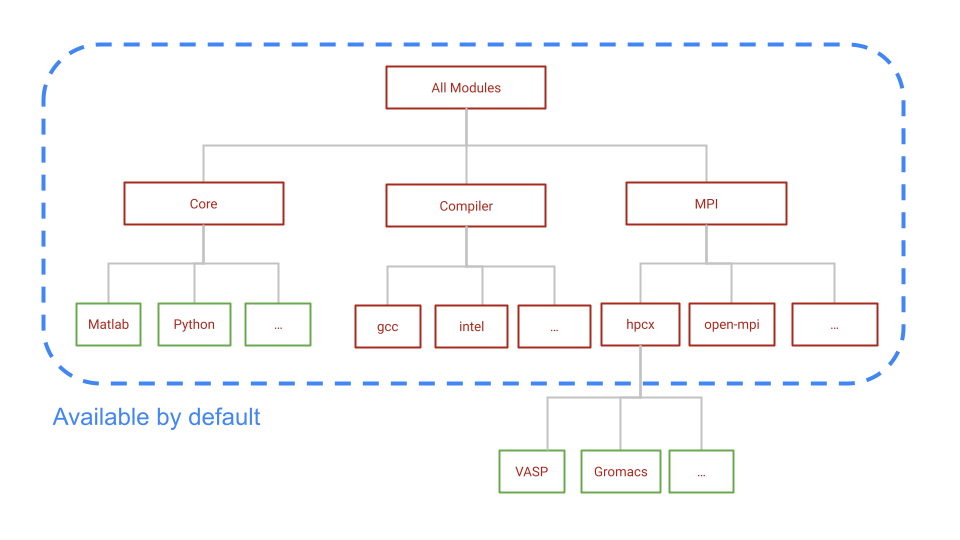
LMOD is hierarchical. The schematic below shows that the three different types of modules available to you after logging in.
1. Core: Softwares that are precompiled binaries or compiled with system compiler (GCC 11.3.0)
2. Compiler: Versions of compilers like GCC, Intel
3. MPI: MPI implementations
As shown in the schematic, Core, compiler and mpi modules are available by default. You can see the list of these modules by running the command `module avail`
To load the modules compiled with MPI, you need to load the corresponding MPI modules first. For example, `Gromacs` module is not available until you load the `hpcx-mpi` module.
You may refer to[ this table](/oscar/sys-changes/module-changes.md) for new module names corresponding to older Oscar modules.
### Module commands:
To load a module, you need to run the command `module load ` . You can see all the available LMOD subcommands by running `module --help.` Here are some of the useful commands.
{% hint style="info" %}
Unlike Pymodules, LMOD will load the dependencies for a package automatically.
{% endhint %}
| Command | Shorter command | |
| ---------------------- | --------------- | ------------------------------------------------------------------------------------------------------------------------------------------------------------------------------------------------------------------------------------ |
| module list | ml | Lists all modules that are currently loaded in your software environment. |
| module avail \ | ml av \ | List available modules that contain "\" |
| module load \ | ml \ | Adds a module to your current environment. If you load using just the name of a module, you will get the default version. To load a specific version, load the module using its full name with the version: "module load fftw/2.1.5" |
| module unload \ | | Removes a module from your current environment. |
| module purge | | Unloads ALL modules |
| module show \ | | show the commands in the module file |
| module spider \ | | Lists all possible versions of \. This includes modules that are NOT core modules. |
## Summary
* LMOD is hierarchical. By default, core, compiler and mpi modules are available.
* Modules compiled with a different compiler are NOT available unless you load that compiler.
* To load modules compiled with MPI, load the MPI module first.
* Run `module spider ` to find all possible module name and versions
* Run `module --help` to see all available subcommands.