Calculating SNR and TSNR using AFNI

The Signal-to-Noise Ratio of an MRI scan offers important information on data quality and signal strength. Researchers often measure it with the goal of assessing quality of the hardware (the MRI itself, head coils, etc). It is also helpful when optimizing MRI sequences. In its simplest definition, the SNR tells you how much of your raw MRI signal can be attributed to the brain versus other sources of variability (e.g, thermal noise). Higher SNR values indicate higher sensitivity to the desired signal. You can calculate SNR on a single frame such as an anatomical scan, and you can also calculate it over time for fMRI scans.

A common metaphor for SNR is the sound of a busy party. If you imagine that you are speaking to your friend, you'll notice that you do not only hear your friend's voice- you also hear other people, music, footsteps, glassware, doors opening, and much more. In this example, your friend's voice is the signal that you wish to separate from the noise. If you took a recording of the sound of the party, there are processing methods you could use to separate the various sources of sound. However, it is also ideal to make recording itself as high quality as possible. This is done by neuroimagers by fine-tuning the MRI sequence so that it it is more sensitive to signal that you are interested in. For anatomical T1-weighted MRI, the sequence is optimized to be sensitive to brain matter. In a functional MRI (fMRI), it is sensitive to the BOLD response.

SNR

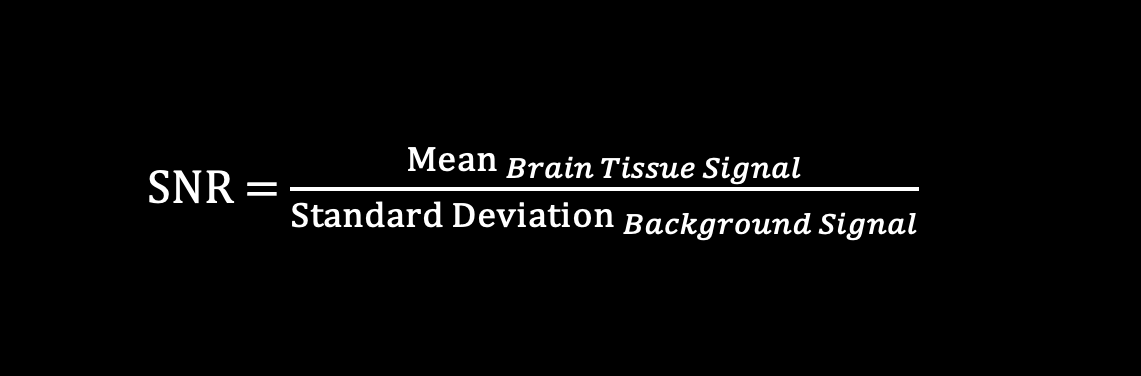
As previously defined, SNR is a number that describes the ratio of structured signal to random noise. In T1-weighted anatomical MRI, spatial SNR is calculated with this equation:

Here we provide a bash script to measure SNR using AFNI commands:

If you run this script on Demodat2 subject 101 session 1, scan sub-101_ses-01_acq-memprageRMS_T1w.nii, this text prints at the very end of processing:

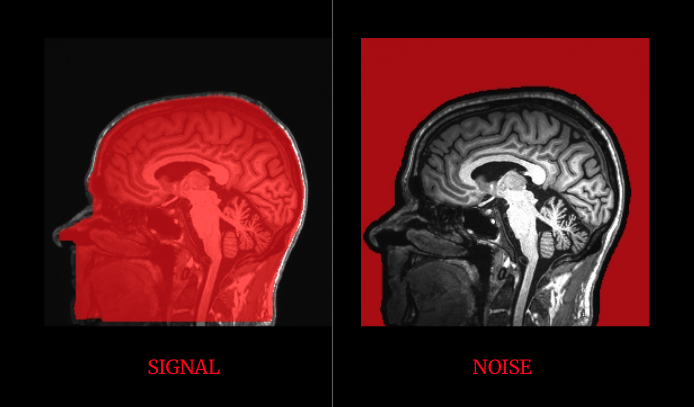
If you then use the AFNI GUI to overlay the signal mask (*.obj.nii) and the noise mask (*.bkgd.nii) on top of the anatomical scan, they will look like this:

A single slice/frame from the T1w anatomical scan of Demodat2 subject 101 session 01. The left image shows the mask used to measure the signal in the SNR equation. The right image shows the mask used to measure the background/noise.
You will notice that the mask used to measure signal does not cover just the brain: it also includes sinuses, CSF, bone, and muscle. It is also common to measure signal using a brain/ROI mask, and then measure the background by masking one or multiple ROIs away from the head. There is no one universal method to calculate SNR, and the resources at the end of this tutorial offer various methods.

TSNR

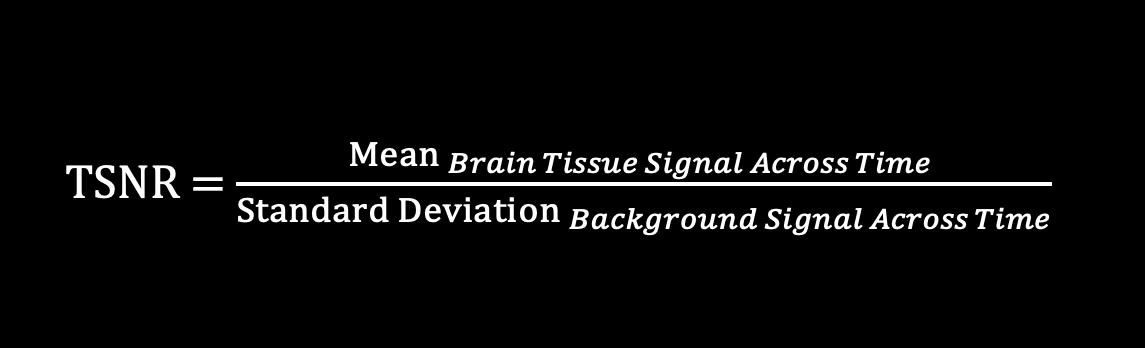
The Temporal Signal-to-Noise Ratio, or TSNR, is very similar to SNR except that the values are measured across time (in a multi-frame 3D+Time dataset). This means that the TSNR value for each voxel is the mean signal intensity over time, divided by the standard deviation of that voxel's time course.

With AFNI, you can calculate TSNR using a single command! However, in order to capture the TSNR of just the brain, we additionally create a brain mask and then take the average of all TSNR values within that mask. You could also use a ROI mask to measure the TSNR of a specific brain area.

Here is a simple script to calculate TSNR:

If you run this script on Demodat2 subject 101, session 1, scan sub-101_ses-01_task-resting_run-01_bold.nii, this text prints at the very end of processing:

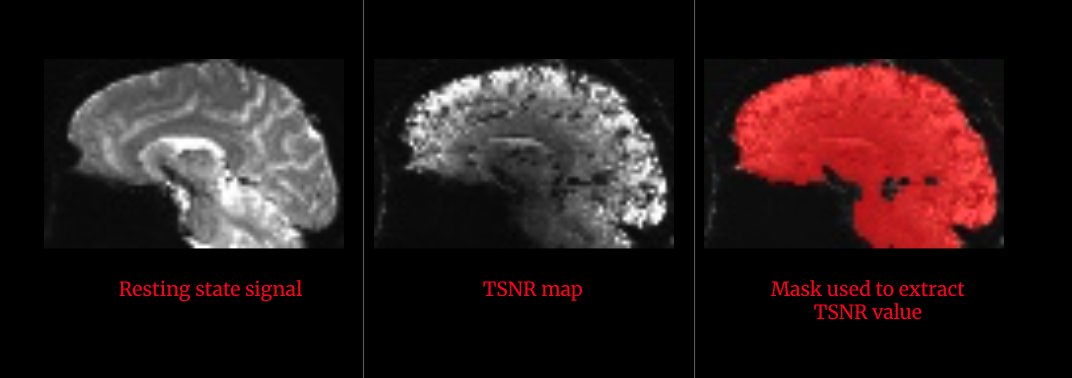
Open these files in the AFNI GUI to see how the resting state scan is transformed from a 3D+Time fMRI scan, to a single frame TSNR map. Additionally, you can overlay any masks used to extract TSNR values.

From right to left: A single slice/frame from the resting state scan of Demodat2 subject 101 session 01; That same slice after calculating TSNR; The TSNR map with the brain mask overlaid.

Both the SNR and TSNR scripts can be run individually, or they can be adapted to loop through multiple subjects/scans and print the values to a summary file.

Additional background on SNR and TSNR:

The mriquestions.com section titled: "MR Quality Control: SNR"arrow-up-right

MRI Master's webpage offering a detailed description of factors that influence SNRarrow-up-right

Newbi 4 fMRI's tutorial/walkthrough of SNR calculations arrow-up-right

Last updated

Was this helpful?